Selasa, 09 Juni 2009

Canon Pixma MX330

Just because you're on a budget doesn't mean you should be relegated to buying some cheap printer that can't function outside of simple text documents. If you need a device that can fax, copy, scan, and print on a wide variety of media, the Canon Pixma MX330 will make a perfect addition to your home office. At $110, this all-in-one boosts productivity by adding an automatic document feeder and a full color 1.80-inch LCD. Although we have complaints about the output quality and missing features, we can't argue with the bundle of features and the excellent value you'll get in the Canon Pixma MX330.

Design and features
The design of the Pixma MX330 is streamlined so that every drawer, tray, and port folds flush into the body. The result is a very sleek matte black and battleship gray exterior with all of the buttons you need to adjust the settings conveniently placed on the front panel. Since the default function is to print, the rest of the hot keys (copy, fax, and scan) are the largest on the panel, surrounded by the power button and two small LEDs to indicate usage and a blinking alarm for low ink or paper jams.

The bright 1.8-inch LCD screen sits prominently in the middle of the control panel, and while we're normally used to adjusting the angle of the screens on Pixma printers, we're thankful that Canon includes an LCD at all in this price range. The rest of the controls include shortcut buttons for "menu," "settings," "back," a directional pad and a corresponding "OK" button for navigating through menus, fax shortcuts for quality, coded dialing, and redials, as well as three more buttons for black and color copies and a "stop print" button for emergency cancels. Overall, the MX330 measures a maneuverable 7.8 inches tall by 18.1 inches wide by 16.2 inches deep.

Most all-in-ones typically don't include auto-document feeders at this price point, so we're happy to see that Canon includes one to make it much easier to scan or copy stacks of documents. The automatic document feeder can only handle up to 30 pages at a time, so the majority of your blank media goes through the rear input tray that holds 100 pages, and a plastic guide folds out of the rear tray to cajole larger media. Output, on the other hand, is a much more simplified process: all outbound prints just pop out of the front drawer onto an angled lip that folds out of the main body. We're disappointed to see that the MX330 doesn't include a multimedia card reader for direct prints, but you can hook up a digital camera directly to the printer through the PictBridge USB port on the bottom of the unit.

The top of the printer lifts open to reveal the standard 8.5 inch by 11 inch scanner bay, but you can also pop that open and access the two ink cartridge bay below. To keep costs low, the MX330 only uses two ink cartridges: one for black and one for tricolors. While we prefer five or sometimes even six separate cartridge tanks to cut down on the cost of consumables, it makes sense a printer at this conservative retail price only has two tanks. If you plan to use your printer for more snapshot photo prints or graphical documents, a printer with separate ink cartridge bays will prove more economical.

The package includes a driver CD with all the installation files you need to customize your prints. Within those settings, you can choose between commonly used templates like standard, business, paper saving, and photo printing that adjust the type of media, paper size, and source. Additionally, the driver provides you with adjustments for borderless printing, vivid photos, grayscale prints, and even manual color intensities by numeral increments. It also features a pop-up print status monitor that shows the current job, document name, device owner, status, and a graphical representation of the ink cartridge levels. Conveniently, this pop up automatically disappears once the job in queue is finished printing, but we prefer status monitors that show us the page and progress of the print.

See Full Info
Read rest of entry

Asus Eee PC 1008HA

With minilaptop competition heating up, even Asus--the company that practically invented the Netbook--has to step up its game. While the internal components will be familiar, the new Eee PC 1008HA (also known called the Seashell) represents a radical design change from the boxy Eee PCs we've seen before, with a slim, tapered design that makes it one of the best-looking Netbooks we've come across.

To get down to about 1 inch thick, some engineering slight-of-hand was required. The VGA output uses a dongle, the Ethernet jack is angled to fit into the thin body, there's a custom-molded (nonremovable) battery, and an LED display shaves a few millimeters off the lid.

One inescapable current Netbook trend is falling prices. With a perfectly serviceable $299 10-inch system coming from Dell and subsidized Netbooks from mobile phone companies, the current standard of $399 for a nicely equipped minilaptop is starting to look like the maximum the market will bear. At $429, the 1008HA slips just over the line, although the difference is more psychological than practical.

See Full Informations
Read rest of entry

TomTom GO 740 Live

Product summary

The good: The TomTom GO 740 Live is the manufacturer's first connected-GPS device, offering up-to-the-minute traffic data, weather forecasts, fuel prices, and Local Search powered by Google. Map Share and IQ Routes technologies allow map data to be updated more frequently. Bluetooth hands-free calling and voice command help the driver to keep both hands on the wheel.

The bad: Route calculations are slow, particularly from a moving vehicle. High entry cost only includes three months of service.

The bottom line: The TomTom GO 740 Live puts a tremendous amount of information at your fingertips and makes it easy to access and process it all from the driver's seat.

Specifications: Destination: Automotive ; Audible assistance: Navigation instructions , Street name announcement , Voice command recognition ; Weight: 7.9 oz See full specs
Read rest of entry

Palm Pre (Sprint)

Product summary

The good: The Palm Pre's multitasking capabilities and notifications system are unparalleled. The smartphone features a vibrant display with multitouch functionality as well as a solid Web browser and good multimedia integration. The Pre offered good call quality and wireless options include 3G, Wi-Fi, Bluetooth, and GPS.

The bad: The Pre's keyboard is cramped. Battery life drains quickly and the smartphone can be sluggish at times. Lacks expansion slot, video-recording capabilities, onscreen keyboard, and Flash support. The Pre App Catalog is still in beta with a limited number of titles.

The bottom line: Despite some missing features and performance issues that make it less than ideal for on-the-go professionals, the Palm Pre offers gadget lovers and consumers well-integrated features and unparalled multitasking capabilities. The hardware could be better, but more importantly, Palm has developed a solid OS that not only rivals the competition but also sets a new standard in the way smartphones handle tasks and manage information.

See Full Spec
Read rest of entry

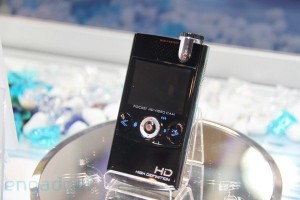
DigiLife DDV-JF1 Pocket HD Camera with Projector

The DigiLife DDV-JF1 is a pocket HD camcorder that is unique in that it has a small LED pico sized projector built in to it. The camera can capture 720p HD at 30 frames per second. Lower resolutions can also be set such as 848 x 480 which allows you to bump up the FPS to 60. The DigiLife has a built in 2.5 inch LCD screen for viewing the images or you can opt for the projector which has a 640 x 260 pixel resolution to watch a larger picture on the wall.
The only downside of having a pico projector built in is battery life. It can be assumed that by using the projector the battery life will significantly drop although used on mains power it could be ideal when watching videos of your holidays while still travelling.

Source : Info
Read rest of entry

Kamis, 04 Juni 2009

Coffee-Cup Power Inverter for In-Car Charging

 
I may be wrong, but in-car cup holders seem to be a mostly US-only phenomenon. It might be that Europeans simply don’t live in their cars like Statesiders, or that our coffee tends to be smaller — espresso sized rather than delivered in buckets, the weak, watery brew sucked through a plastic teat while sitting safely inside the protective steel and rubber womb.

Which is a shame, as this little cup-holder mounted gizmo looks genuinely useful. The $30 Coffee Cup Power Inverter plugs into the 12v cigarette lighter socket and up-converts the power to 120v AC. There’s even a USB socket on there for charging iPods and the like. The unit can supply a continuous 200 watts, so unless you’re hooking up hair dryers and soldering irons, you should be good for anything. Actually, I’ve just thought of another reason this wouldn’t work here in Europe (aside from us needing 220v to power our gear): We tend to use our car cigarette lighters for lighting our cigarettes.
Source : Info
Read rest of entry

MvixBox 2-bay Ultra Performance NAS / Media Server

The MvixBox 2-bay high performance NAS / media server is a 3-in-1 solution for storing media files, operating as a media server, and facilitating file transfer. These features are already available in other options, such as the DViCo TViX M-6500A, but the MvixBox is a more affordable solution that also offers the bonus of dual drive bays.  The functionality could also be achieved by buying a home PC, installing a server OS onto it, and connecting it to the network. However, chances are that even if you manage to get this working without problems, it would cost quite a bit more than even the DViCo TViX M-6500A.

 
Understanding the needs of small businesses and home users, MvixUSA has come up with a very attractive solution. The MvixBox offers many of the features consumers have been asking for in a network media player.  Here are some of the features that the new system offers:

Media server
The MvixBox provides gigabit network speed and large storage capacity, which makes it an ideal system for storing, serving, and transferring media files from one location to another. You can store media files, such as AVI, MPEG, and DIVX movies or MP3 files. From a different room in your home or a meeting room, you can access the content any time needed.

Web Disk Capability
The MvixBox is a Linux-based system, and it comes with what everyone expects Linux servers to include – Apache, MySQL, SQLite, and PHP. To make the server user friendly, a web-disk capability is also provided.  This means the user can drag and drop files between the PC and NAS server. User can launch applications like Windows Explorer, WebDisk Explorer, blog software, RSS reader, Torrent client, and more.  The setup ensures that anyone who knows how to operate a PC in the Windows environment will know how to handle a MvixBox.

Web Server
The web server is perhaps the most interesting feature of all. Since the MvixBox comes with support for Apache, MYSQL, and PHP, you can host web sites directly from the server. There are many different types of sites that you can setup – blogs, wikis, personal home pages, etc. If you don’t want to host web sites, you can even develop scalable intranet solutions using the database support.  This capability makes it one of the most affordable web server solution that the market has to offer for small businesses and home users.

DDNS Server
In order for a web server to recognize Internet domain names, there needs to be a DNS server (or in this case DDNS so that dynamic IPs can be supported). The domain name is mapped to the server IP address, and the DDNS service enables the server to recognize the domain name. Traditional servers supported mostly static IPs. For this reason, you can’t usually operate a web server from home, as most home Internet connections operate on dynamic IPs. Dynamic IPs change all the time, as they are assigned by the ISP. Fortunately, the MvixBox offers free support for dynamic IPs. There is no extra charge for the use of this service.

NAS, Torrent Sharing, and FTP Management
MvixBox offers a simple file sharing feature that provides file encryption when transferring files using HTTP or FTP protocols. You can use the built-in Explorer to transfer files, without having to install additional software.
The system boasts simple and secure administration.
As this is an NAS server, one would expect it to come with simple backup features. The MvixBox does come with easy-to-use data storage scheduling and synchronization. The software is included with the system.
For all the above features, an enthusiast would expect the price tag to be hefty. However, this is not true. The MvixBox retails for around $249.00.  Each unit includes two built-in hard drive bays that are capable of holding up a 1.5 terabyte (TB) hard drive. The hard drives are not included. Therefore, you can buy any size that best meets your needs.  Even with the most expensive hard drive bundled, the entire system still costs just about $600.
Source : Info
Read rest of entry

Pharos Traveler 137 3G Touchphone Launched

Pharos just announced the Traveler 137, a GSM smartphone powered by Windows Mobile 6.1 that will sell as an unlocked device and should work with all GSM networks worldwide including AT&T's 7.2Mbps network and T-Mobile 3G network in the USA. Pharos has loaded its custom GPS software on board. The current version seem very similar (graphically) to the one found in the Pharos 600 GPS/PDA. The price is steep: $599.95 but if you get a 2-year T-Mobile contract (via Pharos), you'll get a $250 discount.

Besides the GPS capabilities, the high note of this smartphone is the 800x480 display resolution that is the best thing you can get for this size. Also, the phone is upgradable to Windows Mobile 6.5, when it comes out and Pharos claims 7 hours of talk time or 200 hours of stand-by time. Specifications in the full post.
Traveler 137 Specifications (from Pharos)
  • Operating System: Microsoft Windows Mobile 6.1 Professional, updateable to Windows Mobile® 6.5
  • Processor: Qualcomm MSM 7201A 528MHz
  • Memory: 256MB DDR SDRAM, 512MB Flash ROM
  • Phone: unlocked GSM quad band 850/900/1800/1900 MHz, EDGE / GPRS,
  • Tri-band 3G, 1700/1900/2100 MHz, UMTS 384Kb/s, HSDPA 7.2Mb/s, HSUPA 2Mb/s
  • Talk time: up to 7 hours on GSM, 5 hours on 3G and 200 hours standby
  • Display: 3.5" TFT LCD with touch panel, 480 x 800 Wide-VGA with 65K colors
  • Wireless: GPS aGPS compatible, Wi-Fi 802.11 b/g, Bluetooth™ v2.1 + EDR , FM tuner
  • Camera: 3 megapixel for picture or video, 0.3 megapixel on the front for video conference
  • Expansion: USB 2.0, micro SD slot support SDHC, stereo audio jack
  • Battery: 1380 mAh Li-Ion, rechargeable/replaceable
  • Size: 4.60in (L) x 2.40in (W) x 0.51in (H)
  • Weight: 4.9 ounces
Source : Info
Read rest of entry

Webhosting: Choosing them based on People’s feedback

At last, I can post something again on this blog, I’ve been very busy so I can’t really update this blog like usually, also I’m waiting for the domain transfer process is fully working before I do anything to this site. Well, I also have a plan that I want to move this website to my new web hosting account seperately from this current account I have, that’s because I think this website needs more space in the future, while currently this blog is hosted on a shared account, so I think it will be wise that I need to setup one more account or maybe a dedicated server account? I will consider about it.
 
Ok, talking about hosting, one important thing I always consider is about the support system provided from The Web Hosting Company to their customers. Customer support is very important aspect which can not be ignored as customer can need the company’s support any time. If customer support is not provided at proper time then in result my site will remain down for long periods of time. A hosting company is said to be a reliable if it is able to provide the support service of 24 hours a day. User should also study about the experience of the company and also the support provided to its customers.

User can easily check with the references to see how the web hosting company rates with customer service. If customer is aware of all these aspects it will be very helpful for me for making decision and can save myself from the time and money loss. So before moving to any decision the user should collect all the complete information such as:
1. What type of control panel the web hosting service offers?
2. Is it user friendly or not?
3. Last but not the least that it suites all the requirements for my site?

Control panel is not required by an experienced webmaster may not need a control panel, but it is necessary for rest of the users. What about the availability of POP Email Accounts?There are some other aspects as well which user can’t afford to miss. One such aspect is POP email accounts being offered by the provider. E-mail service is the service that is needed by many business plans from their web hosting plan. User should look out for the availability, if he/she desires access to email accounts.
Some more things to be known by the user about the web hosting plan are:

1. Does they offer unlimited space transfer?
2. What are the terms of the services regarding upgradation?
3. Availability of the space if more needed in the future.

If the user does not look out for the terms of the space availability in its web hosting service then he/she can suffer from the problems regarding space, as if the user needs more space later on he/she will not be getting it.User is able to make the proper decision of choosing the web hosting service only after having the complete information of each and every services provided by the web host. Ah one more thing that maybe I will consider, it’s starting to be a trend nowadays; does the hosting uses green hosting techonlogy?. Let’s find out them.

Source : Info
Read rest of entry

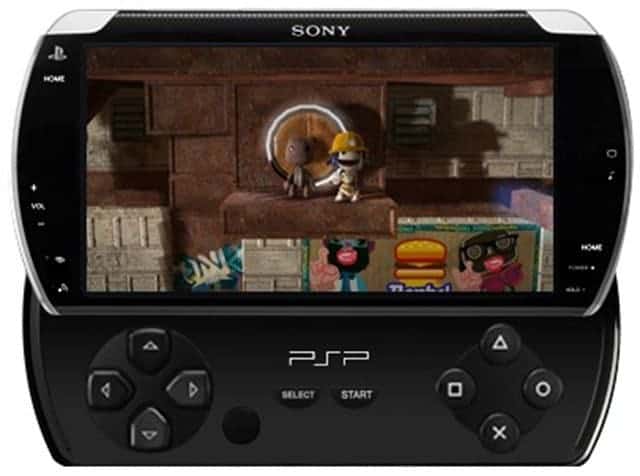
Sony to unveil UMD-less PSP with slide-out buttons at E3

1UP has a bunch of new details about the rumoured PSP2. The sources are apparently from people directly involved with the system.
  • UMD is definitely out and replaced with either 8GB or 16GB flash.
  • Three rumoured names include PSP Slide, PSP Flip, and PSP Go!
  • The same D-pad, analogue nub, and face button configuration remains, but they now slide out from the bottom of the unit
  • Expected launch is September for Japan and late October / early November for US
  • 100 classic and new downloadable titles including Gran Turismo Mobile as a headliner
's supposedly going official with all this during its E3 press conference in early June
 Artist impression via 1up.

Source : Info
Read rest of entry

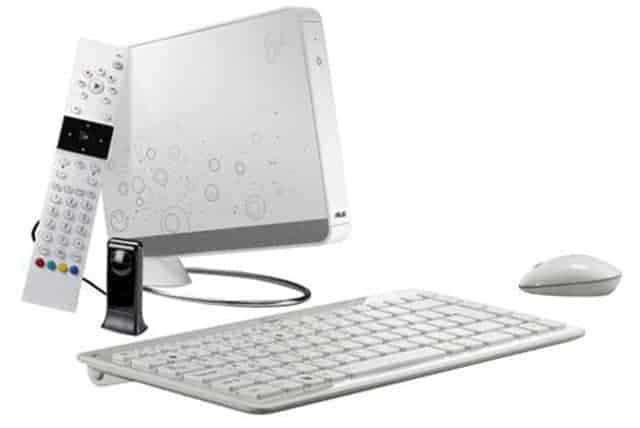
Asus EeeBOX B208

The Acer Revo is touted to hit the nettop market with a storm next month so it is no surprise that are going to release a competitor to the Revo shortly afterwards in June.

Dubbed as the EeeBOX B208, the nettop is powered by Intel’s Atom 330 processor with ATI Radeon HD 4350 256MB video card, a 1GB RAM, a 160GB hard drive, and a 10GB Eee Storage. Other specs are include 802.11 b/g/n Wi-Fi, built-in card reader, 4 USB ports, HDMI out, DVI-D port, Bluetooth, and a built-in battery with UPS function.
 
Source : Info
Read rest of entry

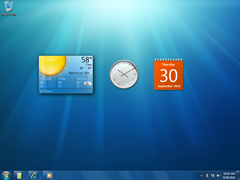
Windows 7 UI Preview and Details

Love it or hate it, it is very likely you will use a based at some point during your working week.
Recently officially named the new version of as . Apparently the decision to use the name is about simplicity and VP, Mike Nash, was quoted saying:

The decision to use the name is about simplicity. Simply put, this is the seventh release of , so therefore just makes sense.

Coming up with an all-new 'aspirational' name does not do justice to what we are trying to achieve, which is to stay firmly rooted in our aspirations for Vista, while evolving and refining the substantial investments in platform technology in Vista into the next generation of .
will ship in both client and server versions with the client versions available in both 32-bit and 64-bit editions.


It is generally regarded that will not be a brand new version of , it is more of an improved version of Vista.
Yesterday gave an extensive demo of the new version of , .

Apparently the new OS will run fine on a 1GHz netbook with 1GB of RAM, but I will believe that when I see it.
Some key points via Engadget from the keynote include:

  • Obviously, the big news is the new taskbar, which forgoes text for icons and has new "jump lists" of app controls and options you can access with a right-click. You can select playlists in Media Player, for example. Super cool: when you scrub over the icons, all the other app go transparent so you can "peek" at the you're pointing at.
  • Gadgets now appear on the desktop -- the sidebar has been killed. That makes more sense for all those laptop owners out there with limited screen space, and you can still see gadgets anytime by peeking at the desktop, rendering all other transparent.
  • Window resizing and management now happens semi-automatically: dragging a window to the top of the screen maximizes it, pulling it down restores; dragging a window to the edges auto-resizes it to 50% for quick tiling. Nifty.
  • The system tray now only displays what you explicitly say it should -- everything else is hidden, and the controls have been streamlined.
  • User Account Control settings are now much more fine-grained -- you can set them by app and by level of access.
  • They demoed multitouch features on an HP TouchSmart -- it was pretty cool, although the usual nagging "what is this good for / that'll get old fast" concerns weren't really addressed. The Start menu gets 25 percent bigger when using touch to make it easier to handle, and apps will all get scroll support automatically. There's also a giant on-screen predictive keyboard. Again -- could be amazing, but we won't know until it's out in the wild.
  • We've always known intends to run on netbooks, and we got a small taste during the PDC keynote: SVP Steve Sinofsky held up his "personal" laptop running , an unnamed 1GHz netbook with 1GB of RAM that looked a lot like an Eee , and said that it still had about half its memory free after boot. (We're guessing it was running a VIA Nano, given the announcement this morning and since most Atoms run at 1.6GHz.)
  • At the other end of the scale, supports machines with up to 256 CPUs.
  • Multiple-monitor management is much-improved, as is setting up projectors -- it's a hotkey away. Remote Desktop now works with multiple monitors as well.
  • Media Center has been tweaked as well -- it looks a lot more like the Zune interface. There's also a new Mini Guide when watching video, and a new Music Wall album artwork screensaver that kicks in when you're playing music.
  • Devs got a pre-beta today; a "pretty good" feature complete beta is due early next year. No word at all on when it'll be released to market apart from that "three years from Vista" date we've known forever.
Source : Info
Read rest of entry

Super-wide 43-inch NEC display is super-expensive

Remember those "wider is better" Pontiac commercials from several years back? NEC will probably need a marketing campaign at least as effective (was that one even effective?) to sell the following behemoth.
On Thursday, NEC officially announced its CRV43 monitor, a 43-inch curved display with a 32:10 aspect ratio and native resolution of 2880x900.
NEC says the display will be available in July with a street price of $8,000. That's right, $8K for a single monitor. Not sold? Will never be sold? Are sold but won't have the money until you finally pull off that bank job you've been planning? Well, maybe the specs will sweeten the deal for you.

I think I've hit bottom as this just became my new goal in life.
(Credit: NEC)
 
The display's panel is made from, according to NEC, "four panels seamlessly blended" in a "unique adaptation of DLP technology." According to the company, this allows the panels to (collectively) post a super-fast response rate of 0.02 milliseconds, as well as low input lag.

Also, while most displays have a color depth of 6-bit or 8-bit, the CRV43 has a 12-bit color depth. This indicates that it should be capable of displaying more colors than a typical monitor. It also has an impressive color gamut that covers 100 percent of the sRGB color range and 99.3 percent of Adobe RGB range. A high color depth and wide color gamut means the display should satisfy most when it comes to color reproduction.

Rounding out the specs list is a 200 cd/m? brightness, 10,000:1 contrast ratio, HDMI and single link DVI connections, and at least one USB port.
Unless you're rollin' VIP big time, you're probably not sold. NEC says the display is designed to be used in applications like professional graphics, higher education, government, financial, command and control, and home office.
I don't see gaming in that list, but I'm sure that's what most of us are thinking, right? Seriously, what does Crysis or WoW look like running on this bad boy? Would Crysis even support a 2880x900 resolution? Hmmm, I'm sure MS Flight Simulator would.

Not that you can afford to buy it even if it they do look amazing, but sometimes it's nice to have lofty goals in life.

Source : NEC Monitor
Read rest of entry

So That’s How the Nokia N97 Slides!

I’ve always assumed the N97 would mimic the form-fitting slide of the Sony Ericsson Xperia X1. According to a video shared by Philippine affiliate Technograph, that’s not the case:
It seems the Nokia N97 will rely on brackets to push the top part to the side and up. Definitely not as seamless as the XPERIA X1, but it works for me. At the very least, the mechanism satisfies the gaudy need to showcase the actual model name of the phone, and the specs summary. Who this satisfies I honestly have no idea.
According to nokia.com.ph/n97preorder, the pre-order period for the Philippines will run from June 16-18. Will this apply to other countries as well? Your guess is as good as mine, but I’ll share any info as I find it out.

Source : info
Read rest of entry

LG breaks the thinness record...

Okay, so it's not quite the thinnest TV ever; that goes to some fancy pants OLED stuff that nobody will be able to afford for about 20 years, but it IS the thinnest LCD TV yet, measuirng just 5.9mm at their thinnest. Woah. That's tiny! I'm sure it'll look good on your wall...but is the extra cash for something just a little bit thinner really worth it?

I'd rather have a fatter but better value TV myself, perhaps with better picture quality too... oh well LG, we await pricing.

Source : LCD TV LG
Read rest of entry
 

My Blog List

Term of Use